Logitech Brio 101 Webcam Review: Is It Worth It?
If you want a simple external webcam for work calls, online classes, or casual streaming, the Logitech Brio 101 is clearly built for that everyday use case. The current Amazon listing shows it as a Full HD 1080p webcam with a built-in microphone, an integrated privacy shutter, USB-A connectivity, and compatibility with platforms like Zoom, Microsoft Teams, and Google Meet. The same listing currently shows a 4.4 out of 5-star rating from 5,432 ratings, an Amazon’s Choice badge, and 10K+ bought in the past month.
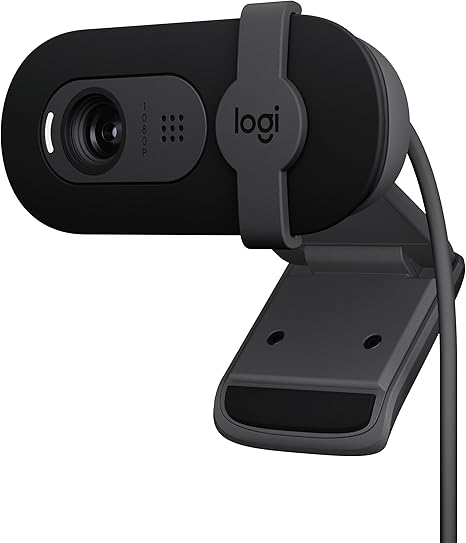
This specific version is the Black, 1 Pack, 1080p model, and it is clearly aimed at people who want a better-looking setup than a built-in laptop camera without moving into premium webcam pricing. Amazon’s product page also highlights RightLight 2 auto light correction, a single omni-directional microphone, a 5-foot attached cable, and support through the Logi Options+ app for adjusting settings.
What This Webcam Is Best For
This webcam makes the most sense for people who want a straightforward upgrade for video meetings, remote work, school calls, and general desktop use. The Amazon page positions it around easy compatibility, plug-and-play setup, and a more polished look on calls rather than around creator-grade features. It records at 1080p/30fps, uses fixed focus, and has a 58-degree field of view, which tells you right away that this is more of a practical call webcam than a wide-angle content creation camera.
Why Buy It?
The biggest reason to buy the Brio 101 is simplicity. Amazon’s listing says it works with most major video calling platforms and uses a built-in USB-A cable for a plug-and-play experience, and the customer summary says buyers find it easy to set up and use, especially on Windows 10 PCs. For someone who just wants to connect a webcam and start using it without extra hassle, that is a real advantage.
Another strong reason is everyday image quality for the category. Amazon says the Brio 101 offers Full HD 1080p resolution, and the customer summary says buyers generally like the video quality and image quality, with 422 quality mentions showing 362 positive, and 379 image-quality mentions showing 306 positive. That suggests this webcam is doing its core job well for normal work and meeting use.
The privacy shutter is also a meaningful feature at this price level. Amazon explicitly calls out the integrated webcam cover, which makes it easy to block the camera when you are not on a call. That is one of those small features that ends up being genuinely useful in everyday life, especially for people who leave a webcam attached all day.
I also like the fact that Logitech includes RightLight 2 auto light correction, and Amazon says it can boost brightness by up to 50% compared with previous-generation Logitech webcams. In real use, that matters most for home offices and bedroom desks where lighting is not always ideal.
Why You Might Skip It
The biggest reason to skip this model is that it stays pretty basic. Amazon’s comparison section lists the Brio 101 with fixed focus, 1x hardware zoom, no autofocus, no RightSight autoframing, and no tripod compatibility. That is completely fine for normal meetings, but it also means this is not the best pick for buyers who want more flexible framing, sharper close-up behavior, or a more creator-friendly setup.
Adjustability is the main area where customer feedback gets less clean. Amazon’s customer summary says buyers disagree on the camera’s adjustability, with some liking the automatic light adjustment while others complain about the lack of angle control. The same summary also says the zoom experience is mixed, and some users feel the camera is too zoomed in on their face.
Audio is another place to keep expectations realistic. Amazon lists one omni-directional microphone, which is fine for ordinary calls, but it is not the same thing as a more advanced dual-mic or dedicated audio setup. If audio quality is especially important for your work, streaming, or content recording, you may still want a separate microphone.
Who Should Buy It?
This webcam is a good fit for someone who wants a reliable plug-and-play webcam for Zoom, Teams, Google Meet, school calls, and casual desktop use. It also makes sense for buyers who care about having a privacy shutter, a recognizable brand, and a simple setup process rather than advanced creator features. The customer summary strongly supports that kind of mainstream use case.
Who Should Skip It?
You may want to skip this one if you need autofocus, a wider field of view, better framing flexibility, or a setup that works more naturally for content creation and more dynamic camera angles. Buyers who want a more premium webcam experience may find the Brio 101 a little too stripped down, even if it performs well for standard video calls.
Final Verdict
My take is simple: the Logitech Brio 101 looks like a smart buy for the person it is actually designed for. The current Amazon listing and review summary point to a webcam that is easy to use, easy to set up, and good enough to noticeably improve everyday calls over a weak built-in laptop camera. The 1080p resolution, privacy shutter, built-in mic, and Logitech software support make it a very practical choice for mainstream users.
The tradeoff is that it stays in the basic lane. You are not getting autofocus, wide-angle flexibility, advanced framing tools, or creator-level audio. But if you want a recognizable, no-fuss webcam for meetings and home-office use, this one looks like a solid option. Amazon also lists FREE Returns and a 30-day refund / replacement policy, which makes trying it a little less risky.
Button text:
View on Amazon